For the complete documentation index, see llms.txt. Markdown versions of all docs pages are available by appending .md to any docs URL.
JWT authorization
Secure your agentgateway with JWT authentication and fine-grained tool access control
Secure your MCP endpoints with JWT authentication and fine-grained tool access control.
What you’ll build
In this tutorial, you configure the following.
- Configure JWT authentication for agentgateway
- Set up fine-grained authorization rules using CEL expressions
- Control which tools are accessible based on JWT claims
- Test authenticated requests with a pre-generated token
Before you begin
- Node.js installed (for the MCP server)
Step 1: Install agentgateway
curl -sL https://agentgateway.dev/install | bashStep 2: Download the test keys
For this tutorial, use the pre-generated test keys from the agentgateway repository:
# Download the JWKS public key
curl -sL https://raw.githubusercontent.com/agentgateway/agentgateway/main/manifests/jwt/pub-key -o pub-key

# Download a pre-generated test JWT token
curl -sL https://raw.githubusercontent.com/agentgateway/agentgateway/main/manifests/jwt/example1.key -o test-token.jwtStep 3: Start an MCP server
Start the “everything” MCP server on port 3001 using mcp-proxy:
npx mcp-proxy --port 3001 -- npx @modelcontextprotocol/server-everythingStep 4: Create the config
cat > config.yaml << 'EOF'
# yaml-language-server: $schema=https://agentgateway.dev/schema/config
binds:
- port: 3000
  listeners:
  - routes:
    - policies:
        cors:
          allowOrigins: ["*"]
          allowHeaders: ["*"]
          exposeHeaders: ["Mcp-Session-Id"]
        jwtAuth:
          issuer: agentgateway.dev
          audiences: [test.agentgateway.dev]
          jwks:
            file: ./pub-key
        mcpAuthorization:
          rules:
          # Public tool - no restrictions
          - 'mcp.tool.name == "echo"'
          # Restricted to specific user
          - 'jwt.sub == "test-user" && mcp.tool.name == "add"'
          # Restricted by custom claim
          - 'mcp.tool.name == "printEnv" && jwt.nested.key == "value"'
      backends:
      - mcp:
          targets:
          - name: mcp
            mcp:
              host: http://localhost:3001/mcp
EOF
Step 5: Start agentgateway
Open a new terminal and run:
agentgateway -f config.yamlExample output:
INFO agentgateway: Listening on 0.0.0.0:3000
INFO agentgateway: Admin UI available at http://localhost:15000/ui/
Step 6: View the test token
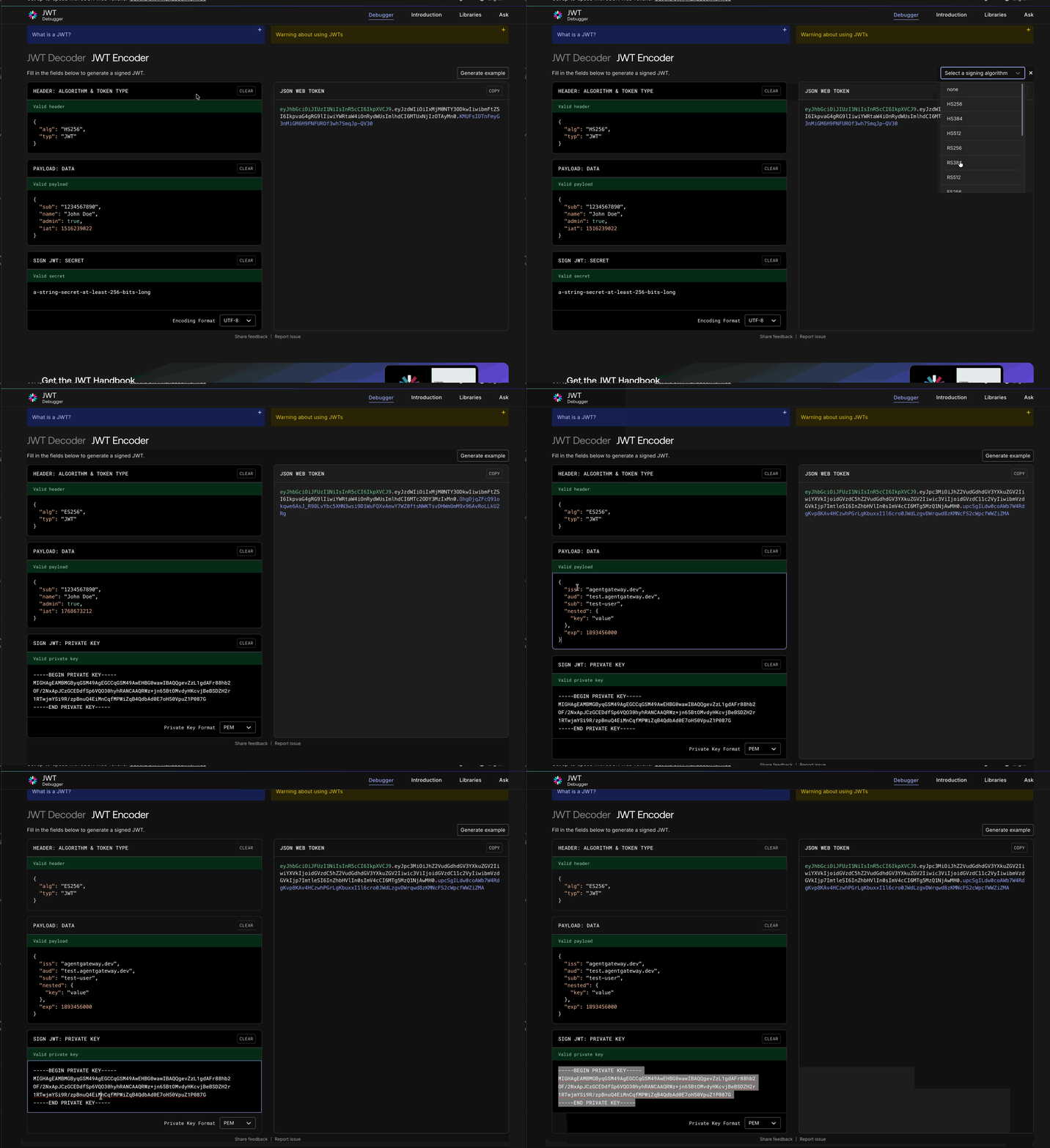
The pre-generated test token contains these claims that match our authorization rules:
{
  "iss": "agentgateway.dev",
  "aud": "test.agentgateway.dev",
  "sub": "test-user",
  "nested": {
    "key": "value"
  },
  "exp": 1900650294
}| Claim | Value | Purpose |
|---|---|---|
iss | agentgateway.dev | Must match the issuer in config |
aud | test.agentgateway.dev | Must match the audiences in config |
sub | test-user | Used in authorization rule for add tool |
nested.key | value | Used in authorization rule for printEnv tool |
exp | 1900650294 | Token expiration (year 2030) |
Inspect the token (optional)
View the raw token:
cat test-token.jwtTo decode and inspect the claims, visit jwt.io and paste the token contents into the Encoded field on the left side.
Step 7: Test with the token
First, initialize a session and get the session ID:
curl -s -i http://localhost:3000/mcp \
  -H "Content-Type: application/json" \
  -H "Accept: application/json, text/event-stream" \
  -H "Authorization: Bearer $(cat test-token.jwt)" \
  -d '{"jsonrpc":"2.0","method":"initialize","params":{"protocolVersion":"2024-11-05","capabilities":{},"clientInfo":{"name":"test","version":"1.0"}},"id":1}'
Copy the mcp-session-id from the response headers, then list the available tools:
curl -s http://localhost:3000/mcp \
  -H "Content-Type: application/json" \
  -H "Accept: application/json, text/event-stream" \
  -H "Authorization: Bearer $(cat test-token.jwt)" \
  -H "Mcp-Session-Id: YOUR_SESSION_ID" \
  -d '{"jsonrpc":"2.0","method":"tools/list","id":2}'
You should see only the three authorized tools: echo, add, and printEnv.
Authorization rules
The configuration above demonstrates three levels of access:
| Tool | Access Level | Rule |
|---|---|---|
echo | Public | No restrictions |
add | User-specific | Only test-user can access |
printEnv | Claim-based | Requires nested.key == "value" |
Rule syntax
MCP authorization rules use CEL (Common Expression Language) expressions:
mcpAuthorization:
  rules:
  # Match by subject
  - 'jwt.sub == "admin" && mcp.tool.name in ["tool1", "tool2"]'

  # Match by role claim
  - '"admin" in jwt.roles && mcp.tool.name == "admin_tool"'

  # Match by email domain
  - 'jwt.email.endsWith("@company.com") && mcp.tool.name == "internal_tool"'