For the complete documentation index, see llms.txt. Markdown versions of all docs pages are available by appending .md to any docs URL.
Chatbot UI
Front Chatbot UI with agentgateway to keep API keys server-side and audit every chat.
Chatbot UI is an open-source ChatGPT-style interface by Mckay Wrigley. Because it speaks the OpenAI Chat Completions API, you can point it at agentgateway instead of directly at OpenAI to centralize credentials, apply policies, and capture audit logs.
What you get
- Browser users no longer hold the OpenAI API key — agentgateway does.
- A consistent place to apply rate limits and capture observability data.
- The same gateway can later front additional providers without changing Chatbot UI.
Architecture
┌─────────────────┐     ┌─────────────────┐     ┌─────────────────┐
│   Chatbot UI    │────▶│   agentgateway  │────▶│     OpenAI      │
│   (port 3000)   │     │   (port 3001)   │     │                 │
└─────────────────┘     └─────────────────┘     └─────────────────┘
Before you begin
- Install the agentgateway binary.
- Get an API key for your LLM provider (e.g. OpenAI).
- Clone or run Chatbot UI. Note that recent versions of Chatbot UI require a Supabase backend; see the upstream README for the full setup.
Steps
Step 1: Configure agentgateway
You can configure agentgateway in the UI or in your configuration file.
To create the same configuration in the UI, follow these steps.
Set your OpenAI API key, create a configuration file with an empty
llmsection, and start agentgateway. The UI checks that theOPENAI_API_KEYenvironment variable exists when you save the model.export OPENAI_API_KEY='<your-api-key>' cat > config.yaml <<'EOF' llm: models: [] EOF agentgateway -f config.yamlAdd the model.
Open LLM > Models, such as http://localhost:15000/ui/llm/models, and click Add model.
From the Provider dropdown, select OpenAI.
In the Incoming model match field, replace the default
openai/*with*.For the Provider API key, select Env var, and enter
OPENAI_API_KEY.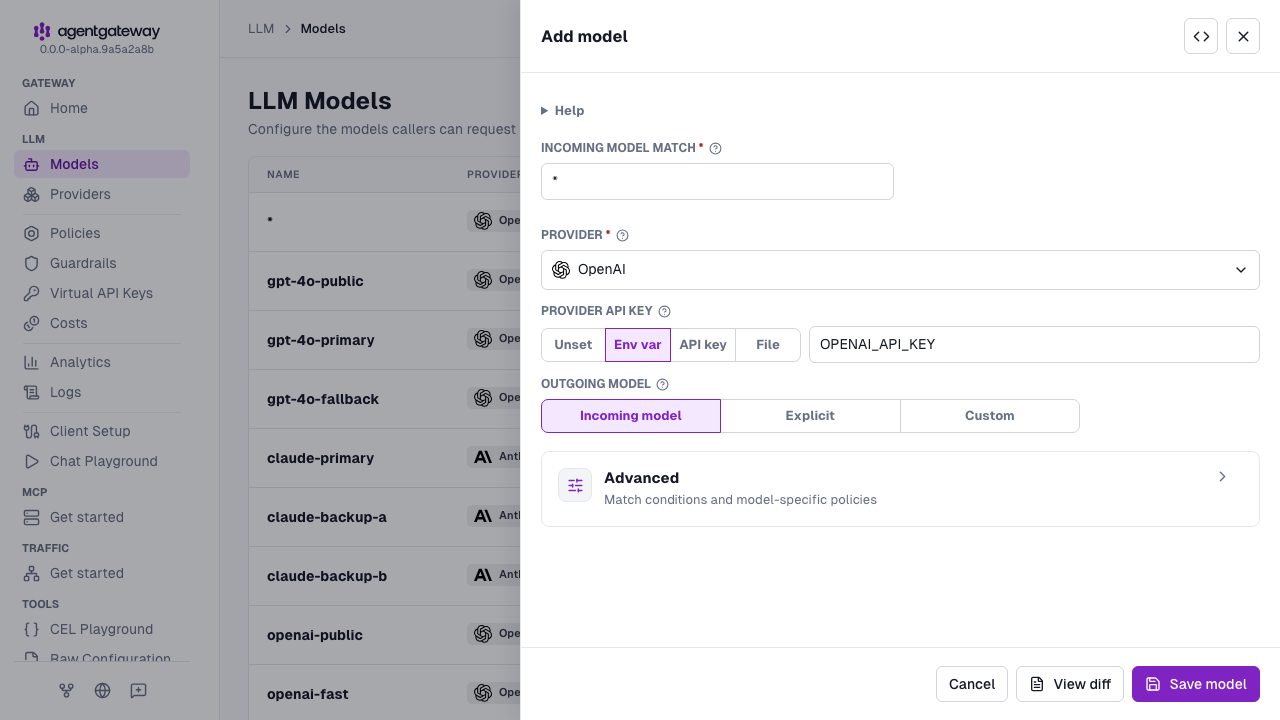
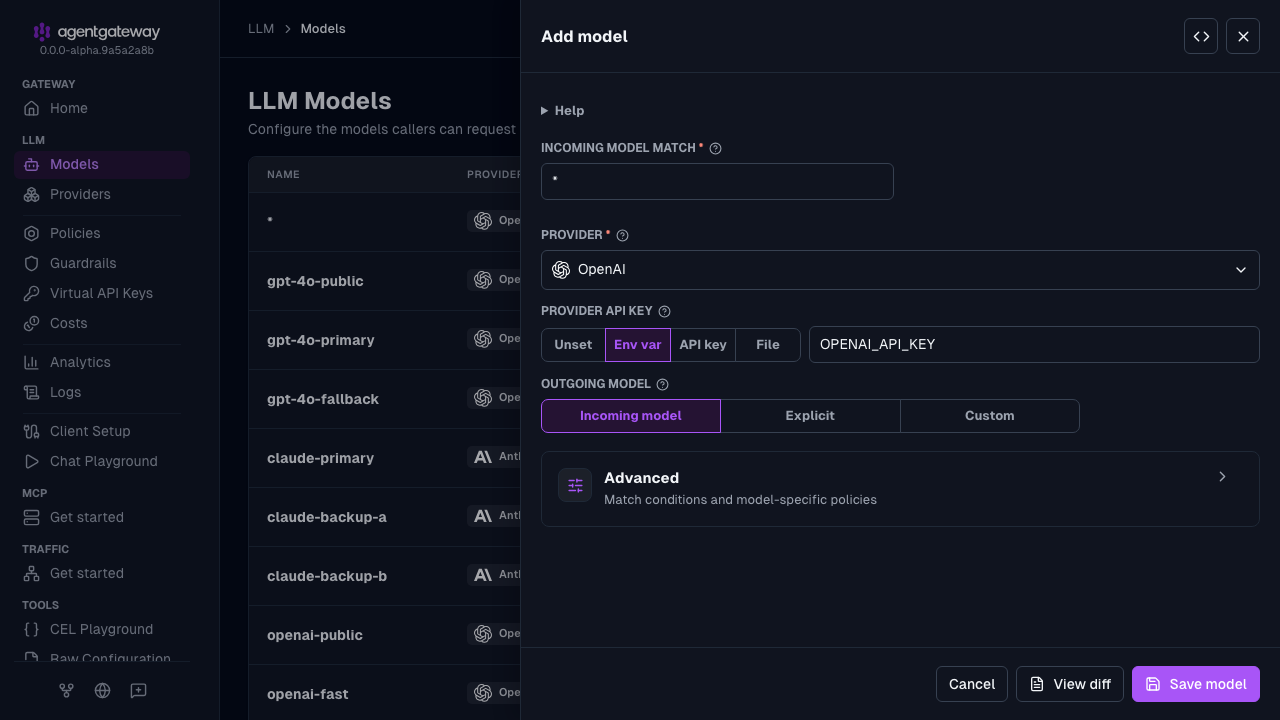
Click Save model.
Serve LLM traffic on port
3001.- Open the Gateway Overview page, such as http://localhost:15000/ui/.
- On the LLM row, click Settings.
- Enter
3001for the Port, and click Save settings.
The UI writes the same deprecated llm.port field as the Config file tab, plus an empty llm.gateways list. If your configuration defines gateways, the Settings drawer shows a Gateway dropdown instead of Port, and binds LLM traffic to the gateway that you select. The UI also writes the provider as openai instead of openAI. Agentgateway accepts both values.
Whether the UI can save depends on your storage mode. For more information, see Save changes from the UI.
Agentgateway is already running with the new configuration, so skip Step 2.
Step 2: Start agentgateway
export OPENAI_API_KEY='<your-api-key>'
agentgateway -f config.yaml
Step 3: Point Chatbot UI at agentgateway
Set Chatbot UI’s environment variables in its .env.local so that requests target the gateway instead of OpenAI directly.
OPENAI_API_HOST=http://localhost:3001
OPENAI_API_KEY=placeholder
The following table describes each environment variable:
| Variable | Description |
|---|---|
OPENAI_API_HOST | The base URL of the agentgateway proxy. |
OPENAI_API_KEY | Must be non-empty for Chatbot UI to start, but it is not used to call OpenAI — agentgateway holds the real key. |
Note
If you run Chatbot UI via Docker, replace localhost with host.docker.internal so the container can reach agentgateway on your host machine:
docker run --rm -p 3000:3000 \
  --add-host=host.docker.internal:host-gateway \
  -e OPENAI_API_KEY=placeholder \
  -e OPENAI_API_HOST=http://host.docker.internal:3001 \
  ghcr.io/mckaywrigley/chatbot-ui:main
The --add-host flag ensures host.docker.internal resolves correctly on Linux.
If you are running a Supabase-backed build of Chatbot UI, the equivalent variable is the OpenAI base URL field in the user Settings screen; set it to http://localhost:3001/v1.
Step 4: Send a message
Open http://localhost:3000 in your browser. Send a chat. Confirm in the agentgateway logs that the request was proxied to your LLM provider. You should see a log entry similar to:
info request gateway=default/default listener=llm route=internal/model:* endpoint=api.openai.com:443 http.method=POST http.path=/v1/chat/completions http.status=200 protocol=llm gen_ai.operation.name=chat gen_ai.provider.name=openai gen_ai.request.model=gpt-4o gen_ai.usage.input_tokens=4419 gen_ai.usage.output_tokens=10 duration=2195ms