For the complete documentation index, see llms.txt. Markdown versions of all docs pages are available by appending .md to any docs URL.
Axiom
Export standalone agentgateway traces, access logs, and metrics to Axiom.
Axiom is an observability platform that accepts OpenTelemetry traces, logs, and metrics. Agentgateway can export traces and access logs directly to Axiom over OpenTelemetry Protocol (OTLP) HTTP. An OpenTelemetry Collector scrapes the agentgateway Prometheus endpoint and forwards metrics to Axiom.
Before you begin
- Complete the LLM quickstart.
- Install Docker if you want to export metrics.
- Sign up for an Axiom account.
Create the Axiom datasets and API token
Axiom requires a dedicated dataset for each OpenTelemetry signal. Create two Events datasets for traces and access logs, and one Metrics dataset for metrics. Then, create an API token that can send data to all three datasets.
Log in to the Axiom dashboard.
Go to Settings > Datasets and views, and click New dataset.
Create the following datasets. You can use different names.
Example name Kind Signal agentgateway-tracesEvents Traces agentgateway-logsEvents Access logs agentgateway-metricsMetrics Metrics Go to Settings > API tokens, and click New API token.
Give the token a name, select Basic, and grant it ingest access to all three datasets.
Create the token and copy it immediately. Axiom does not display the token again.
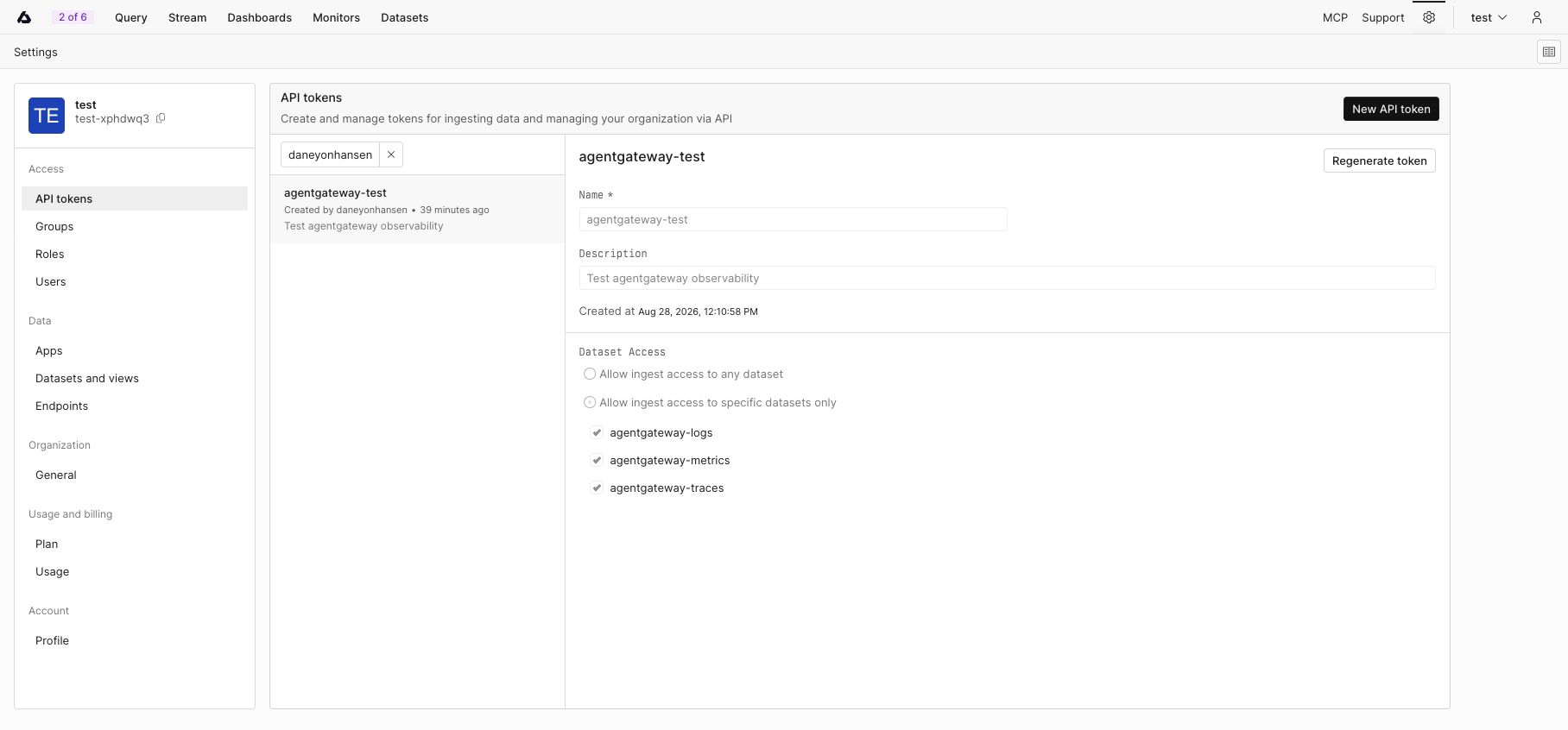
A Basic Axiom API token scoped to the three agentgateway telemetry datasets. A Basic Axiom API token scoped to the three agentgateway telemetry datasets. Save the token and dataset names in environment variables. Do not commit these values to source control.
export AXIOM_API_TOKEN="<your-api-token>"
export AXIOM_TRACES_DATASET="agentgateway-traces"
export AXIOM_LOGS_DATASET="agentgateway-logs"
export AXIOM_METRICS_DATASET="agentgateway-metrics"
Set the Axiom ingest domain. The following example uses the Axiom Cloud API endpoint. If your datasets use an edge deployment, set this variable to its base domain instead. Include only the hostname, without a scheme such as
https://and without a trailing path.export AXIOM_DOMAIN="api.axiom.co"
Important
Agentgateway resolves ${...} references in the configuration file from its own environment when the process starts, and it exits with an error if a referenced variable is unset. Export these variables in the same terminal that you start agentgateway from, or set them another way, such as in a systemd unit or a Docker --env-file.
Export traces and access logs
Add the following frontendPolicies section to your agentgateway configuration. Axiom selects the destination dataset from the x-axiom-dataset header, and traces and access logs go to different datasets, so each exporter sets its own value for that header.
# yaml-language-server: $schema=https://agentgateway.dev/schema/config
frontendPolicies:
  tracing:
    host: ${AXIOM_DOMAIN}:443
    protocol: http
    randomSampling: true
    clientSampling: true
    policies:
      backendTLS: {}
      requestHeaderModifier:
        set:
          Authorization: Bearer ${AXIOM_API_TOKEN}
          x-axiom-dataset: ${AXIOM_TRACES_DATASET}
    resources:
      service.name: '"agentgateway"'
    attributes:
      llm.input_messages: >-
        flattenRecursive(llm.prompt.map(c, {"message": c}))
      llm.output_messages: >-
        flattenRecursive(llm.completion.map(c, {
          "role": "assistant",
          "content": c
        }))
  accessLog:
    otlp:
      host: ${AXIOM_DOMAIN}:443
      protocol: http
      policies:
        backendTLS: {}
        requestHeaderModifier:
          set:
            Authorization: Bearer ${AXIOM_API_TOKEN}
            x-axiom-dataset: ${AXIOM_LOGS_DATASET}
      fields:
        add:
          llm.input_messages: >-
            flattenRecursive(llm.prompt.map(c, {"message": c}))
          llm.output_messages: >-
            flattenRecursive(llm.completion.map(c, {
              "role": "assistant",
              "content": c
            }))
Review the following fields before you start agentgateway.
| Field | Description |
|---|---|
host | Axiom ingest host and port, in hostname:port format. Axiom accepts OTLP/HTTP on port 443. |
protocol | OTLP protocol variant. Set this field to http, because Axiom accepts OTLP over HTTP. |
randomSampling | Determines how often agentgateway starts a new trace. The value true traces every request, which is useful while you verify the integration. Lower this value for production traffic. |
clientSampling | Determines whether agentgateway honors a sampling decision that the client sends. |
policies.backendTLS | Enables TLS for the connection to Axiom. An empty object uses the default settings. |
policies.requestHeaderModifier.set | Headers that agentgateway sends with each export request. Axiom requires the Authorization and x-axiom-dataset headers. |
resources | Resource attributes that apply to every exported span, such as service.name. Each value is a Common Expression Language (CEL) expression, so a literal string is quoted twice. |
attributes and fields.add | Extra key-value pairs to include in each span or access log entry. Each value is a CEL expression. |
Neither exporter sets a path field, so agentgateway uses the default OTLP/HTTP paths, /v1/traces for traces and /v1/logs for access logs. Axiom expects both of these paths.
The llm.input_messages and llm.output_messages attributes export the prompt and the completion. Reading llm.prompt and llm.completion causes agentgateway to inspect the request and response bodies, so omit these attributes if you do not want to export message content.
Export metrics
Agentgateway exposes Prometheus metrics on port 15020. Run an OpenTelemetry Collector that scrapes this endpoint and exports the metrics to Axiom over OTLP/HTTP.
Unlike traces and access logs, Axiom requires the x-axiom-metrics-dataset header for metrics.
Create an
otel-collector-config.yamlfile.receivers: prometheus/agentgateway: config: scrape_configs: - job_name: agentgateway scrape_interval: 10s static_configs: - targets: - host.docker.internal:15020 processors: memory_limiter: check_interval: 1s limit_mib: 256 batch: {} exporters: otlphttp/axiom: endpoint: https://${env:AXIOM_DOMAIN} headers: Authorization: Bearer ${env:AXIOM_API_TOKEN} x-axiom-metrics-dataset: ${env:AXIOM_METRICS_DATASET} service: pipelines: metrics: receivers: [prometheus/agentgateway] processors: [memory_limiter, batch] exporters: [otlphttp/axiom]The
${env:...}references stay in the file, and the collector resolves them from its own environment at startup. The next step passes the three variables into the container.Start the OpenTelemetry Collector. The
host-gatewayentry lets the container scrape the agentgateway process that runs on the host.docker run --rm --name axiom-metrics-collector \ --add-host=host.docker.internal:host-gateway \ -v "$PWD/otel-collector-config.yaml:/etc/otelcol-contrib/config.yaml:ro" \ -e AXIOM_DOMAIN \ -e AXIOM_API_TOKEN \ -e AXIOM_METRICS_DATASET \ otel/opentelemetry-collector-contrib:0.128.0
For production deployments, review the collector’s resource limits, batching, and deployment model for your expected telemetry volume.
Optional: Add resource attributes
Add resource attributes to frontendPolicies.tracing.resources to help filter and group traces in Axiom. Resource values are static CEL expressions that apply to every exported span.
frontendPolicies:
  tracing:
    resources:
      service.name: '"agentgateway"'
      deployment.environment.name: '"production"'
      service.version: '"2.1.0"'
For per-request values such as the selected model, use span attributes instead of a static resource attribute. For more information, see Add span and resource attributes.
Verify the integration
Start agentgateway with the updated configuration, in a terminal where the
AXIOM_*variables are exported.Send an LLM request through agentgateway. The following example assumes that agentgateway runs locally on port
4000and that you configured an OpenAI-compatible provider and thegpt-3.5-turbomodel.curl http://localhost:4000/v1/chat/completions \ -H 'content-type: application/json' \ -d '{ "model": "gpt-3.5-turbo", "messages": [ { "role": "user", "content": "Reply with exactly: Axiom observability works" } ] }'Find the request in the agentgateway logs and copy its
trace.idvalue. A successful request resembles the following example.info request gateway=default/default route=internal/llm:request http.status=200 trace.id=4d50f6d1cb4099a1a22e50b6d339d5f2 span.id=a3f2ae9119406264 protocol=llm gen_ai.provider.name=openaiIn Axiom, verify each signal.
- Click Stream, select the traces Events dataset, and open the event that has the trace ID. Click Find trace to open the trace waterfall after Axiom recognizes the dataset as an OpenTelemetry trace dataset. Axiom also automatically creates an OpenTelemetry Traces dashboard for the dataset.
- Click Stream, select the access logs Events dataset, and find an access log that has the same trace ID.
- Click Query, select the metrics dataset, and query an agentgateway metric such as
agentgateway_gen_ai_client_token_usage. The Stream view does not support Metrics datasets.
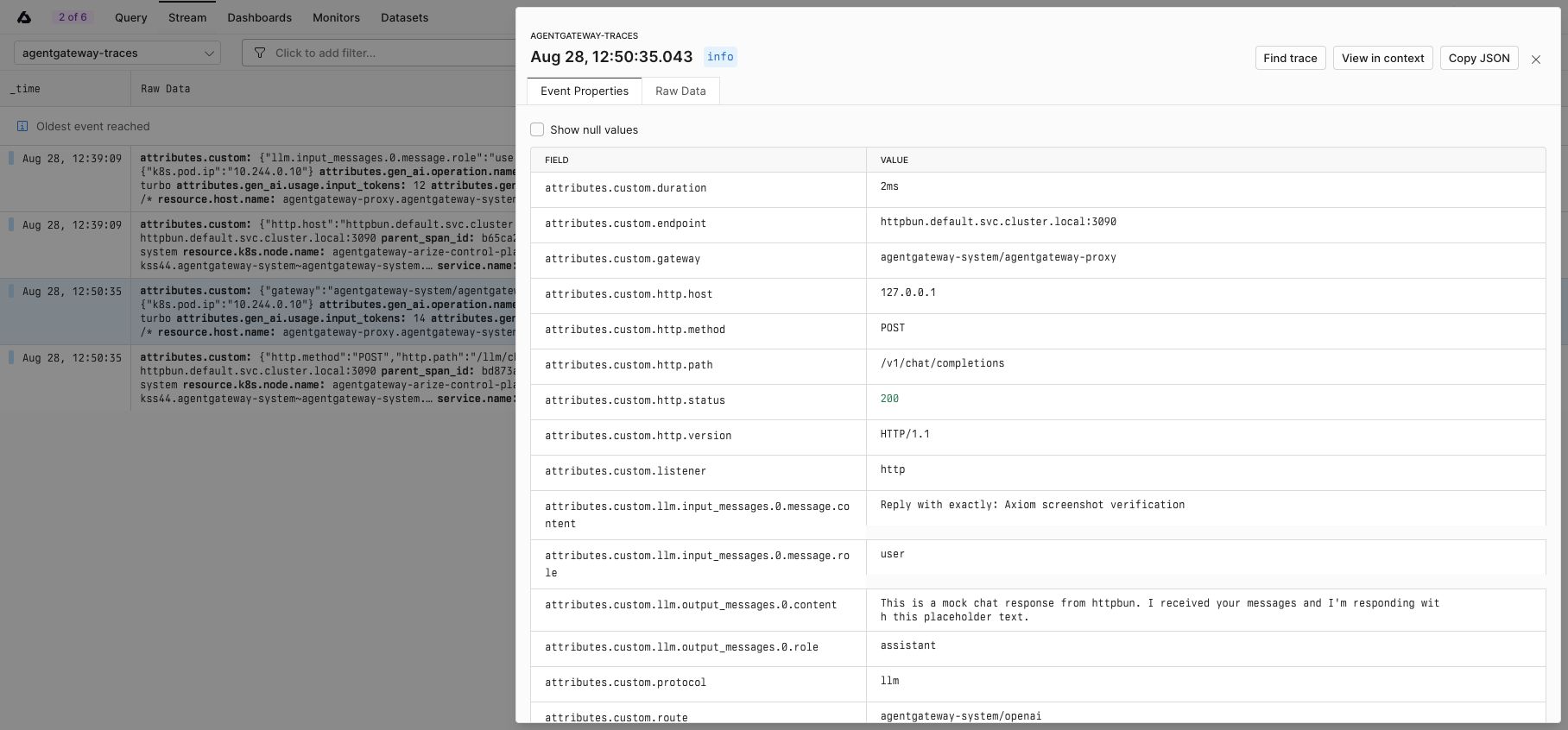
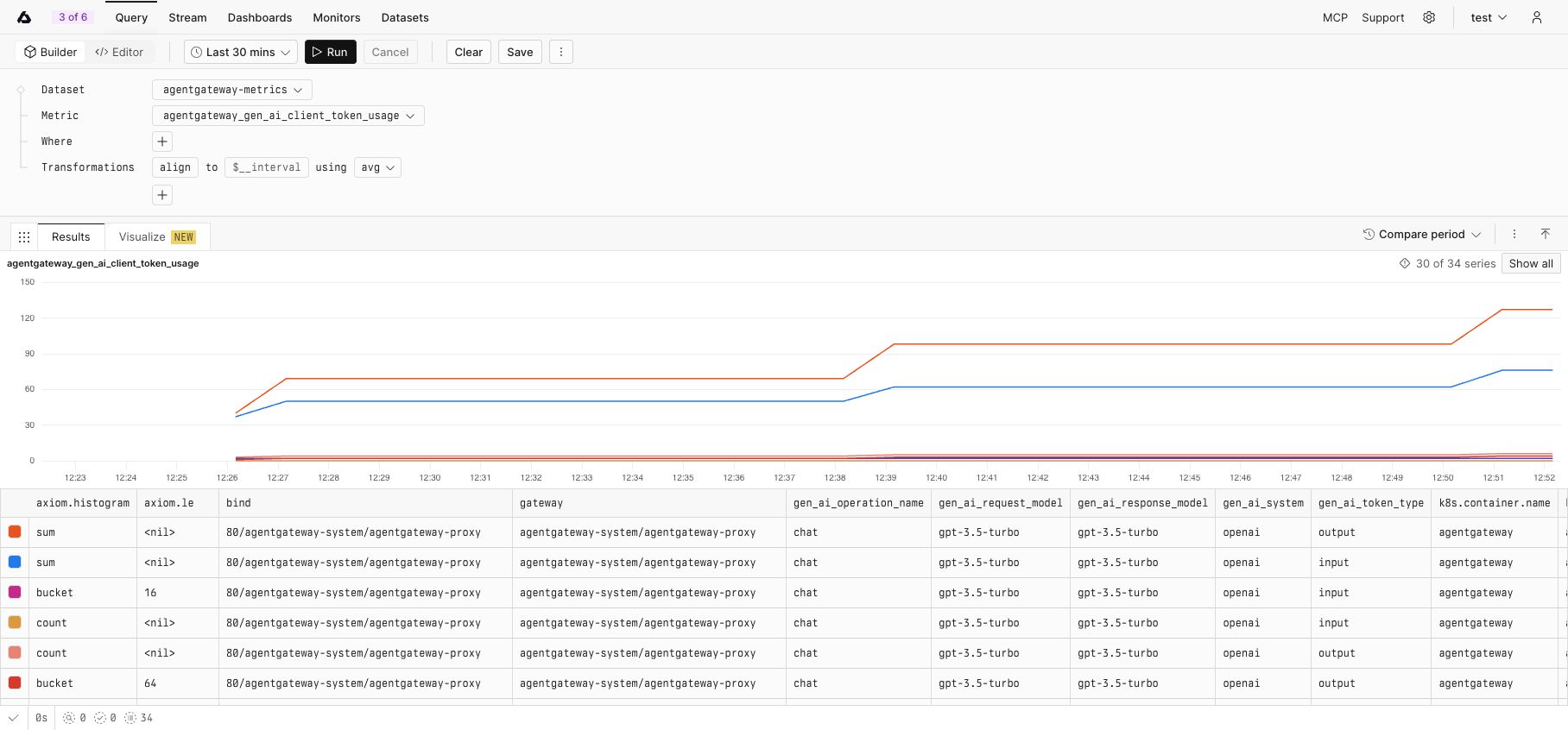
Agentgateway and the collector batch their exports, so allow several seconds for new data to appear. Automatic dashboards and trace-dataset detection can take longer than event ingestion.
Troubleshoot the integration
Confirm that the Basic API token has ingest access to all three datasets.
Confirm that the traces and access logs datasets use the Events kind and that the metrics dataset uses the Metrics kind.
Use
x-axiom-datasetfor traces and access logs, andx-axiom-metrics-datasetfor metrics.Confirm that
AXIOM_DOMAINcontains only the ingest hostname, without a scheme such ashttps://and without a trailing path.Confirm that the
AXIOM_*variables are exported in the environment that agentgateway starts in. Agentgateway resolves the${...}references in the configuration file at startup, and it exits with an error if a variable is unset.Set
randomSampling: truewhile testing so that agentgateway starts a trace for every request.Confirm that the agentgateway metrics endpoint is available before you start the collector.
curl http://localhost:15020/metricsCheck the agentgateway output for OTLP trace or access-log exporter errors.
Check the collector output for metrics scrape or export errors.
For more information, see the Axiom OpenTelemetry documentation.
Cleanup
Stop the metrics collector by pressing
Ctrl+C. If you started it in the background, remove the container.docker rm -f axiom-metrics-collectorDelete the collector configuration file.
rm otel-collector-config.yamlRemove the
frontendPolicies.tracingandfrontendPolicies.accessLogsections from your agentgateway configuration file, and restart agentgateway.Unset the Axiom environment variables.
unset AXIOM_API_TOKEN AXIOM_DOMAIN AXIOM_TRACES_DATASET AXIOM_LOGS_DATASET AXIOM_METRICS_DATASET
