For the complete documentation index, see llms.txt. Markdown versions of all docs pages are available by appending .md to any docs URL.
Arize AX
Export agentgateway LLM traces to Arize AX over OTLP/HTTP or OTLP/gRPC.
Arize AX is an AI observability platform that accepts OpenTelemetry traces and displays LLM inputs, outputs, models, and token usage. Agentgateway can export directly to Arize AX over OTLP/HTTP or OTLP/gRPC without a separate OpenTelemetry Collector.
Before you begin
- Complete the LLM quickstart.
- Arize account: Sign up for an Arize account.
- Arize API key and Space ID: Obtain an API key and Space ID from the Arize platform.
Get your Arize API key and Space ID
Log in to the Arize dashboard.
Go to Settings > API Keys > Service Keys, and click New Service Key.
For Account Role, select Member. Add an organization, and then add the spaces that the service key can access.
Create the service key and copy the API service key, such as
ak-5245b124-1ef5-5514-....Copy the base64 Space ID for the space that receives the traces, such as
U3BhY2U6TbN4WkU6wshdaf==. The Space ID is different from the space name and organization ID.Set the following environment variables in the environment where agentgateway runs. Do not add the values to your agentgateway configuration file or commit them to source control.
export ARIZE_API_KEY="<your-api-key>"
export ARIZE_SPACE_ID="<your-space-id>"
For OTLP/HTTP, agentgateway sends the API key and Space ID in the
arize-api-keyandarize-space-idrequest headers. For OTLP/gRPC, it sends them as theapi_keyandspace_idmetadata headers.
Choose an Arize endpoint
Use the collector host for your Arize AX region.
| Region | Collector host |
|---|---|
| US | otlp.arize.com |
| US regional | otlp.us-central-1a.arize.com |
| EU | otlp.eu-west-1a.arize.com |
| Canada | otlp.ca-central-1a.arize.com |
Save the collector host for your region in an environment variable. The following examples use the US collector.
export ARIZE_HOST="otlp.arize.com"Configure trace export
Update the agentgateway configuration file that you created as part of Before you begin to add Arize AX as your tracing backend. Choose either OTLP/HTTP or OTLP/gRPC for your protocol, and add the custom tracing attributes that you require. The authentication header names differ by protocol.
For OTLP/HTTP, use the arize-api-key and arize-space-id headers.
# yaml-language-server: $schema=https://agentgateway.dev/schema/config
frontendPolicies:
  tracing:
    host: ${ARIZE_HOST}:443
    protocol: http
    randomSampling: true
    clientSampling: true
    policies:
      backendTLS: {}
      requestHeaderModifier:
        set:
          arize-api-key: ${ARIZE_API_KEY}
          arize-space-id: ${ARIZE_SPACE_ID}
    resources:
      service.name: '"agentgateway"'
      openinference.project.name: '"agentgateway"'
    attributes:
      span.name: '"openai.chat"'
      openinference.span.kind: '"LLM"'
      llm.system: "llm.provider"
      llm.model_name: "coalesce(llm.responseModel, llm.requestModel)"
      llm.input_messages: >-
        flattenRecursive(llm.prompt.map(c, {"message": c}))
      llm.output_messages: >-
        flattenRecursive(llm.completion.map(c, {
          "role": "assistant",
          "content": c
        }))
      llm.token_count.prompt: "llm.inputTokens"
      llm.token_count.completion: "llm.outputTokens"
llm.token_count.total: "llm.totalTokens"The values under resources and attributes are CEL expressions. The extra quotes around static values, such as '"agentgateway"', make the CEL expression evaluate to a string. The authentication headers are regular header values and do not require CEL quoting.
Change openinference.project.name if you want traces to appear in a different Arize project. Arize creates the project when it receives the first trace.
Optional: Add resource attributes
Agentgateway supports custom OpenTelemetry resource attributes through frontendPolicies.tracing.resources. Resource attributes are added to every exported span and can help you filter and group traces in Arize AX.
Add attributes such as model_id, model_version, or deployment.environment.name to the resources section of your OTLP/HTTP or OTLP/gRPC configuration.
frontendPolicies:
  tracing:
    resources:
      service.name: '"agentgateway"'
      openinference.project.name: '"agentgateway"'
      model_id: '"gpt-4o-production"'
      model_version: '"2026-08-27"'
      deployment.environment.name: '"production"'
Resource values are static CEL expressions that are initialized with the tracer and apply to every request. If agentgateway routes requests to multiple models, use the llm.model_name span attribute from the preceding OTLP/HTTP or OTLP/gRPC configuration to record the model for each request instead of setting a single model_id resource value.
For more information, see Add span and resource attributes.
Verify the integration
- Start agentgateway with the updated configuration.
- Send an LLM request through agentgateway. The following example assumes that agentgateway runs locally on port
4000and has an OpenAI-compatible provider and thegpt-3.5-turbomodel configured.curl http://localhost:4000/v1/chat/completions \ -H 'content-type: application/json' \ -d '{ "model": "gpt-3.5-turbo", "messages": [ { "role": "user", "content": "Reply with exactly: Arize tracing works" } ] }' - Find the request in the agentgateway logs and copy its
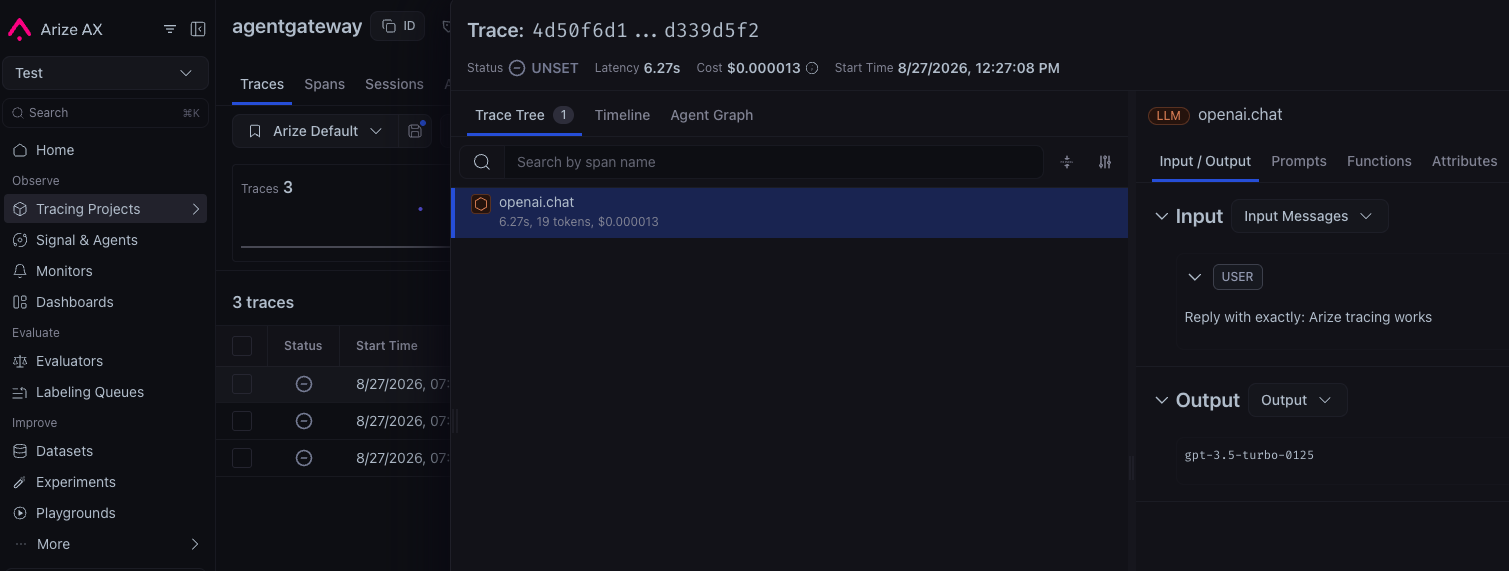
trace.idvalue. A successful request resembles the following example.info request gateway=default/default route=internal/llm:request http.status=200 trace.id=4d50f6d1cb4099a1a22e50b6d339d5f2 span.id=a3f2ae9119406264 protocol=llm gen_ai.provider.name=openai - In Arize AX, open Tracing Projects, select the project that you defined in the
openinference.project.namefield, and search for the trace ID. Trace export is batched, so allow several seconds for the trace to appear.
Troubleshoot trace export
- Use the header names that correspond to your selected protocol: hyphenated headers for OTLP/HTTP and underscore headers for OTLP/gRPC.
- Confirm that
ARIZE_API_KEYandARIZE_SPACE_IDare set in the process environment that starts agentgateway. - Confirm that the collector host matches your Arize region and that
openinference.project.nameis set. - Set
randomSampling: truewhile testing so that agentgateway starts a trace for every request.
For more information about Arize authentication and OpenTelemetry export, see the Arize AX manual instrumentation documentation.
