For the complete documentation index, see llms.txt. Markdown versions of all docs pages are available by appending .md to any docs URL.
Header and query match
Verified Code examples on this page have been automatically tested and verified.Use header and query matchers in a route delegation setup.
Use header and query matchers in a route delegation setup.
Configuration overview
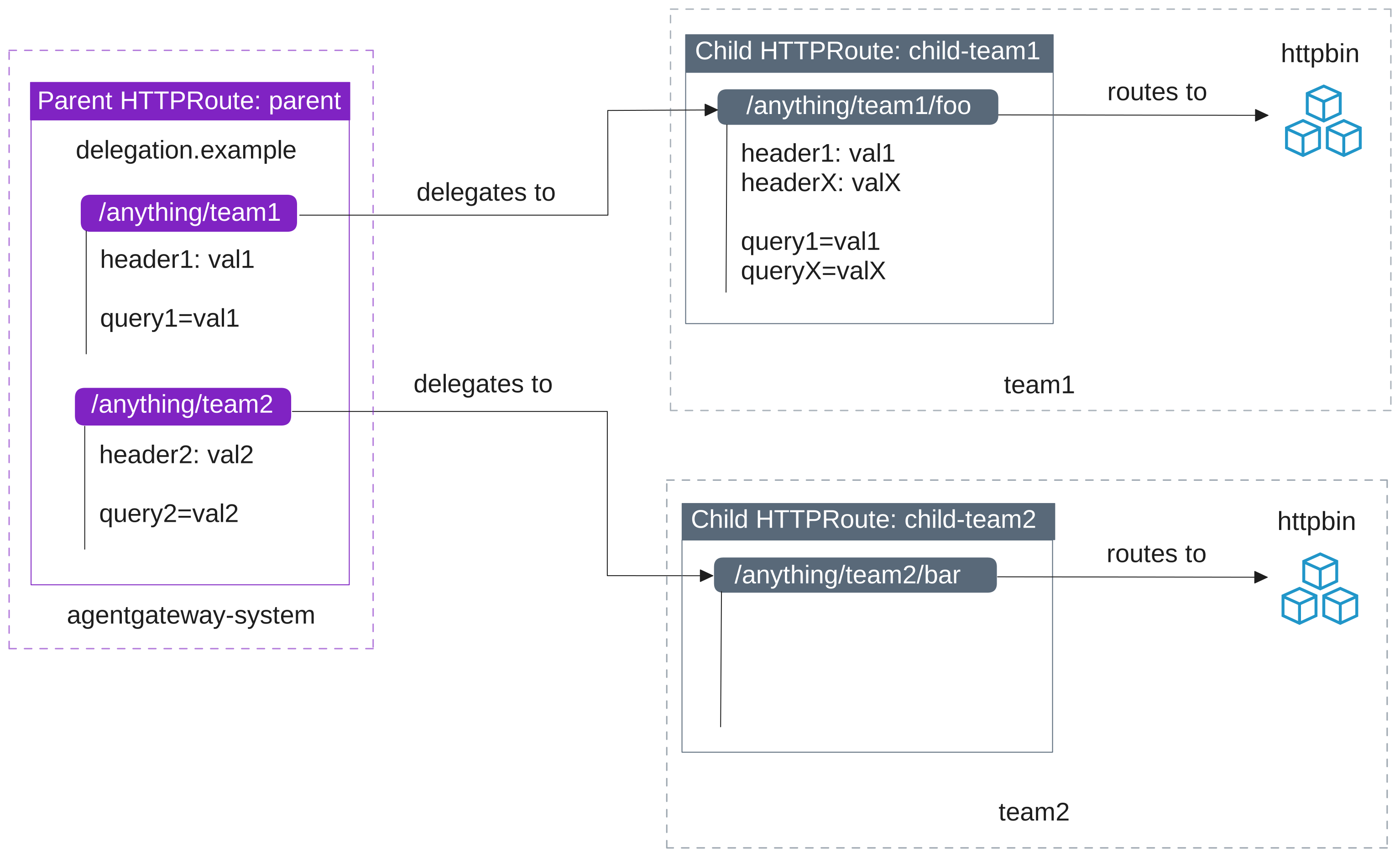
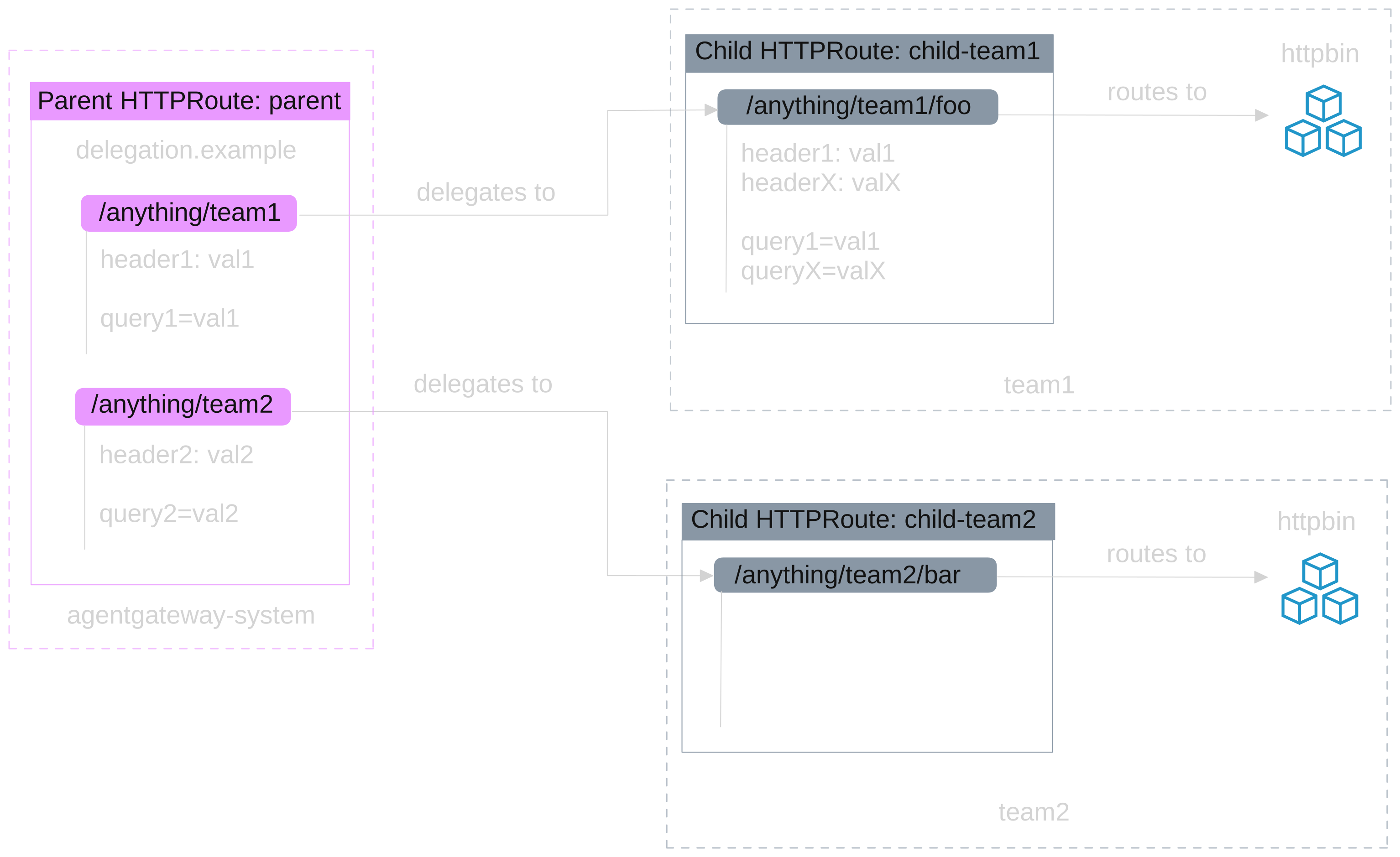
In this guide, you add headers and query parameters as matchers on a parent HTTPRoute. Parent matchers control which requests are delegated. Child matchers independently control which delegated requests are routed to a backend. A child can define additional matchers beyond what the parent specifies, or rely solely on path matching.
The following image illustrates the route delegation hierarchy:
parent HTTPRoute:
- Delegates traffic as follows:
/anything/team1is delegated tochild-team1in namespaceteam1for requests that include theheader1: val1request header and thequery1=val1query parameter./anything/team2is delegated tochild-team2in namespaceteam2for requests that include theheader2: val2request header and thequery2=val2query parameter.
child-team1 HTTPRoute:
- Matches incoming traffic for the
/anything/team1/fooprefix path when the request includes theheader1: val1andheaderX: valXheaders and thequery1=val1andqueryX=valXquery parameters. Matching requests are forwarded to the httpbin app in theteam1namespace. The child defines additional header and query parameter matchers beyond what the parent specifies.
child-team2 HTTPRoute:
- Matches incoming traffic for the
/anything/team2/barexact path and routes that traffic to the httpbin app in theteam2namespace. Unlikechild-team1, this child does not define any header or query parameter matchers. It relies solely on path matching, while the parent’s matchers control which requests are delegated.
Before you begin
Follow the Get started guide to install agentgateway.
Follow the Sample app guide to create the
agentgateway-proxyGateway with an HTTP listener.Get the external address of the agentgateway proxy and save it in an environment variable.
export INGRESS_GW_ADDRESS=$(kubectl get svc -n agentgateway-system agentgateway-proxy -o jsonpath="{.status.loadBalancer.ingress[0]['hostname','ip']}") echo $INGRESS_GW_ADDRESSCreate the namespaces for
team1andteam2.kubectl create namespace team1 kubectl create namespace team2Deploy the httpbin app into both namespaces. The httpbin app exposes endpoints such as
/anything/...,/headers, and/delay/Nthat are useful for verifying routing and policy behavior.curl -sL https://raw.githubusercontent.com/kgateway-dev/kgateway/main/examples/httpbin.yaml \ | awk 'BEGIN{skip=0} /^kind: Namespace$/{skip=1} skip==0{print} /^---$/{skip=0}' \ | sed 's/namespace: httpbin/namespace: team1/g' \ | kubectl apply -f - curl -sL https://raw.githubusercontent.com/kgateway-dev/kgateway/main/examples/httpbin.yaml \ | awk 'BEGIN{skip=0} /^kind: Namespace$/{skip=1} skip==0{print} /^---$/{skip=0}' \ | sed 's/namespace: httpbin/namespace: team2/g' \ | kubectl apply -f -Verify that the httpbin apps are up and running.
kubectl get pods -n team1
kubectl get pods -n team2
Example output:
NAME                       READY   STATUS    RESTARTS   AGE
httpbin-6bc5b79755-xlvjf   3/3     Running   0          7s
NAME                       READY   STATUS    RESTARTS   AGE
httpbin-6bc5b79755-twxq9   3/3     Running   0          6s
Setup
Create the parent HTTPRoute that matches incoming traffic on the
delegation.exampledomain. The HTTPRoute specifies two routes:- Route 1 matches on the following conditions. If they are met, the routing decision is delegated to a child HTTPRoute in the
team1namespace.- path prefix match on
/anything/team1 - exact header match on
header1=val1 - exact query parameter match on
query1=val1
- path prefix match on
- Route 2 matches on the following conditions. If they are met, the routing decision is delegated to a child HTTPRoute in the
team2namespace.- path prefix match on
/anything/team2 - exact header match on
header2=val2 - exact query parameter match on
query2=val2
- path prefix match on
kubectl apply -f- <<EOF apiVersion: gateway.networking.k8s.io/v1 kind: HTTPRoute metadata: name: parent namespace: agentgateway-system spec: hostnames: - delegation.example parentRefs: - name: agentgateway-proxy rules: - matches: - path: type: PathPrefix value: /anything/team1 headers: - type: Exact name: header1 value: val1 queryParams: - type: Exact name: query1 value: val1 backendRefs: - group: gateway.networking.k8s.io kind: HTTPRoute name: child-team1 namespace: team1 - matches: - path: type: PathPrefix value: /anything/team2 headers: - type: Exact name: header2 value: val2 queryParams: - type: Exact name: query2 value: val2 backendRefs: - group: gateway.networking.k8s.io kind: HTTPRoute name: child-team2 namespace: team2 EOF- Route 1 matches on the following conditions. If they are met, the routing decision is delegated to a child HTTPRoute in the
Create the
child-team1HTTPRoute in theteam1namespace that matches traffic on the/anything/team1/foopath prefix when theheader1: val1andheaderX: valXrequest headers and thequery1=val1andqueryX=valXquery parameters are present. Requests that meet these conditions are forwarded to the httpbin app.kubectl apply -f- <<EOF apiVersion: gateway.networking.k8s.io/v1 kind: HTTPRoute metadata: name: child-team1 namespace: team1 spec: rules: - matches: - path: type: PathPrefix value: /anything/team1/foo headers: - type: Exact name: header1 value: val1 - type: Exact name: headerX value: valX queryParams: - type: Exact name: query1 value: val1 - type: Exact name: queryX value: valX backendRefs: - name: httpbin port: 8000 EOFCreate the
child-team2HTTPRoute in theteam2namespace that matches traffic on the/anything/team2/barexact path. Unlikechild-team1, this child does not define any header or query parameter matchers. The parent’s matchers still control which requests are delegated to theteam2namespace.kubectl apply -f- <<EOF apiVersion: gateway.networking.k8s.io/v1 kind: HTTPRoute metadata: name: child-team2 namespace: team2 spec: rules: - matches: - path: type: Exact value: /anything/team2/bar backendRefs: - name: httpbin port: 8000 EOFSend a request to the
delegation.exampledomain along the/anything/team1/foopath with theheader1: val1request header and thequery1=val1query parameter. Verify that you get a 404 HTTP response. Although you included the header and query parameter that are defined on the parent, the headers and query parameters that the child also matches on (headerXandqueryX) are missing.curl -i "http://$INGRESS_GW_ADDRESS:8080/anything/team1/foo?query1=val1" \ -H "host: delegation.example" -H "header1: val1"Example output:
HTTP/1.1 404 Not Found
content-type: text/plain
server: agentgateway
Send another request along the
/anything/team1/foopath. This time, include all of the headers and query parameters that the parent and child define. Verify that you get a 200 HTTP response.curl -i "http://$INGRESS_GW_ADDRESS:8080/anything/team1/foo?query1=val1&queryX=valX" \ -H "host: delegation.example" -H "header1: val1" -H "headerX: valX"Example output:
HTTP/1.1 200 OK
access-control-allow-credentials: true
access-control-allow-origin: *
content-type: application/json; encoding=utf-8
server: agentgateway
Send a request along the
/anything/team2/barpath with the parent’s matchers (header2andquery2). Verify that you get a 200 HTTP response. The parent’s rule delegates the request to theteam2namespace, andchild-team2matches on path alone with no additional header or query parameter requirements.curl -i "http://$INGRESS_GW_ADDRESS:8080/anything/team2/bar?query2=val2" \ -H "host: delegation.example" -H "header2: val2"Example output:
HTTP/1.1 200 OK
access-control-allow-credentials: true
access-control-allow-origin: *
content-type: application/json; encoding=utf-8
server: agentgateway
Send another request along the
/anything/team2/barpath, but without the parent’s matchers. Verify that you get a 404 HTTP response. Even thoughchild-team2matches on path alone, the parent requiresheader2: val2andquery2=val2to delegate the request to theteam2namespace.curl -i http://$INGRESS_GW_ADDRESS:8080/anything/team2/bar \ -H "host: delegation.example"Example output:
HTTP/1.1 404 Not Found
content-type: text/plain
server: agentgateway
Cleanup
You can remove the resources that you created in this guide.kubectl delete httproute parent -n agentgateway-system
kubectl delete httproute child-team1 -n team1
kubectl delete httproute child-team2 -n team2
kubectl delete namespaces team1 team2