For the complete documentation index, see llms.txt. Markdown versions of all docs pages are available by appending .md to any docs URL.
Axiom
Export agentgateway traces, access logs, and metrics to Axiom.
Axiom is an observability platform that accepts OpenTelemetry traces, logs, and metrics. Agentgateway can export traces and access logs directly to Axiom over OpenTelemetry Protocol (OTLP) HTTP. An OpenTelemetry Collector scrapes the agentgateway Prometheus endpoint and forwards metrics to Axiom.
Before you begin
- Install agentgateway in your Kubernetes cluster.
- Set up an agentgateway proxy.
- Set up an LLM provider and route in agentgateway.
- Install the
kubectlandhelmcommand-line tools. - Sign up for an Axiom account.
Create the Axiom datasets and API token
Axiom requires a dedicated dataset for each OpenTelemetry signal. Create two Events datasets for traces and access logs, and one Metrics dataset for metrics. Then, create an API token that can send data to all three datasets, and store the token in a Kubernetes Secret.
Log in to the Axiom dashboard.
Go to Settings > Datasets and views, and click New dataset.
Create the following datasets. You can use different names.
Example name Kind Signal agentgateway-tracesEvents Traces agentgateway-logsEvents Access logs agentgateway-metricsMetrics Metrics Go to Settings > API tokens, and click New API token.
Give the token a name, select Basic, and grant it ingest access to all three datasets.
Create the token and copy it immediately. Axiom does not display the token again.
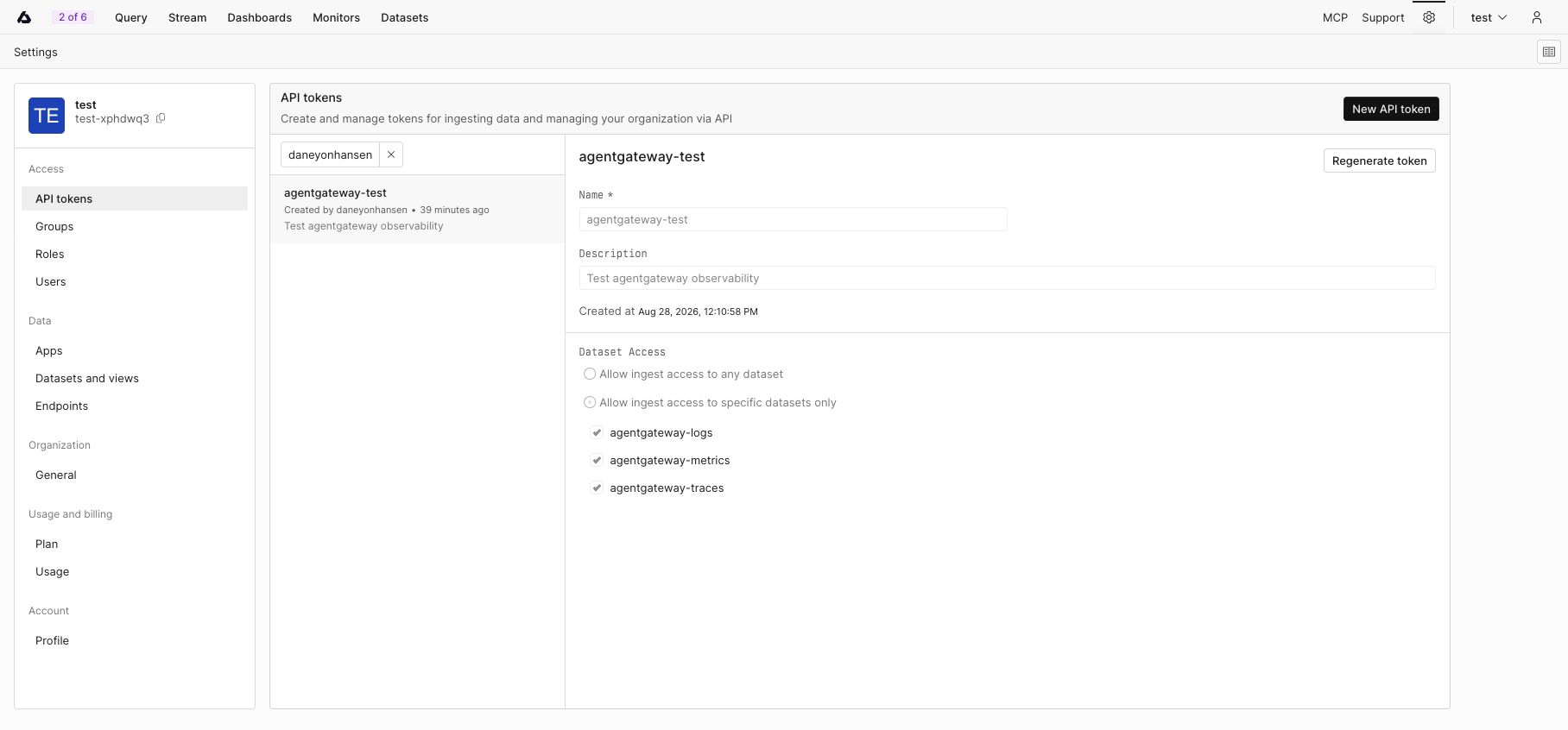
A Basic Axiom API token scoped to the three agentgateway telemetry datasets. A Basic Axiom API token scoped to the three agentgateway telemetry datasets. Save the token and dataset names in environment variables. Do not commit these values to source control.
export AXIOM_API_TOKEN="<your-api-token>"
export AXIOM_TRACES_DATASET="agentgateway-traces"
export AXIOM_LOGS_DATASET="agentgateway-logs"
export AXIOM_METRICS_DATASET="agentgateway-metrics"
Set the Axiom ingest domain. The following example uses the Axiom Cloud API endpoint. If your datasets use an edge deployment, set this variable to its base domain instead. Include only the hostname, without a scheme such as
https://and without a trailing path.export AXIOM_DOMAIN="api.axiom.co"Create a Kubernetes Secret in the same namespace as the agentgateway proxy. The Secret stores the complete bearer-token value that agentgateway and the OpenTelemetry Collector send in the
Authorizationheader, along with the name of each dataset.kubectl apply -f- <<EOF apiVersion: v1 kind: Secret metadata: name: axiom-credentials namespace: agentgateway-system type: Opaque stringData: authorization: "Bearer ${AXIOM_API_TOKEN}" traces-dataset: "${AXIOM_TRACES_DATASET}" logs-dataset: "${AXIOM_LOGS_DATASET}" metrics-dataset: "${AXIOM_METRICS_DATASET}" EOF
Export traces and access logs
Axiom selects the destination dataset from the x-axiom-dataset header, and traces and access logs go to different datasets. Because the header value is fixed per backend, create one AgentgatewayBackend for each signal. Then, attach an AgentgatewayPolicy that exports traces and access logs from the agentgateway-proxy Gateway.
Important
Before you continue, remove or update any existing AgentgatewayPolicy that configures tracing or OTLP access-log export for the same Gateway. Multiple policies might report ATTACHED=True, but only one exporter configuration per telemetry signal takes effect.
kubectl apply -f- <<EOF
apiVersion: agentgateway.dev/v1alpha1
kind: AgentgatewayBackend
metadata:
  name: axiom-traces
  namespace: agentgateway-system
spec:
  static:
    host: ${AXIOM_DOMAIN}
    port: 443
  policies:
    tls: {}
    auth:
      credentials:
      - location:
          header:
            name: Authorization
        secretRef:
          name: axiom-credentials
          key: authorization
      - location:
          header:
            name: x-axiom-dataset
        secretRef:
          name: axiom-credentials
          key: traces-dataset
---
apiVersion: agentgateway.dev/v1alpha1
kind: AgentgatewayBackend
metadata:
  name: axiom-logs
  namespace: agentgateway-system
spec:
  static:
    host: ${AXIOM_DOMAIN}
    port: 443
  policies:
    tls: {}
    auth:
      credentials:
      - location:
          header:
            name: Authorization
        secretRef:
          name: axiom-credentials
          key: authorization
      - location:
          header:
            name: x-axiom-dataset
        secretRef:
          name: axiom-credentials
          key: logs-dataset
---
apiVersion: agentgateway.dev/v1alpha1
kind: AgentgatewayPolicy
metadata:
  name: axiom-observability
  namespace: agentgateway-system
spec:
  targetRefs:
  - group: gateway.networking.k8s.io
    kind: Gateway
    name: agentgateway-proxy
  frontend:
    tracing:
      backendRef:
        group: agentgateway.dev
        kind: AgentgatewayBackend
        name: axiom-traces
        port: 443
      protocol: HTTP
      randomSampling: "true"
      clientSampling: "true"
      resources:
      - name: service.name
        expression: '"agentgateway"'
      attributes:
        add:
        - name: llm.input_messages
          expression: 'flattenRecursive(llm.prompt.map(c, {"message": c}))'
        - name: llm.output_messages
          expression: 'flattenRecursive(llm.completion.map(c, {"role": "assistant", "content": c}))'
    accessLog:
      otlp:
        backendRef:
          group: agentgateway.dev
          kind: AgentgatewayBackend
          name: axiom-logs
          port: 443
        protocol: HTTP
        attributes:
          add:
          - name: llm.input_messages
            expression: 'flattenRecursive(llm.prompt.map(c, {"message": c}))'
          - name: llm.output_messages
            expression: 'flattenRecursive(llm.completion.map(c, {"role": "assistant", "content": c}))'
EOF
Review the following fields before you apply the policy.
| Field | Description |
|---|---|
protocol | OTLP protocol variant. Set this field to HTTP, because Axiom accepts OTLP over HTTP. The default is GRPC. |
randomSampling | Common Expression Language (CEL) expression that determines how often agentgateway starts a new trace. The value "true" traces every request, which is useful while you verify the integration. Lower this value for production traffic. |
clientSampling | CEL expression that determines whether agentgateway honors a sampling decision that the client sends. |
resources | Resource attributes that apply to every exported span, such as service.name. Each value is a CEL expression, so a literal string is quoted twice. |
attributes.add | Extra key-value pairs to include in each span or access log entry. Each value is a CEL expression. |
Neither exporter sets a path field, so agentgateway uses the default OTLP/HTTP paths, /v1/traces for traces and /v1/logs for access logs. Axiom expects both of these paths.
The llm.input_messages and llm.output_messages attributes export the prompt and the completion. Reading llm.prompt and llm.completion causes agentgateway to inspect the request and response bodies, so omit these attributes if you do not want to export message content.
Export metrics
Agentgateway exposes Prometheus metrics on port 15020. Install an OpenTelemetry Collector that discovers the annotated agentgateway proxy pods, scrapes their metrics, and exports the metrics to Axiom over OTLP/HTTP.
Unlike traces and access logs, Axiom requires the x-axiom-metrics-dataset header for metrics.
helm upgrade --install axiom-metrics-collector opentelemetry-collector \
  --repo https://open-telemetry.github.io/opentelemetry-helm-charts \
  --version 0.127.2 \
  --set mode=deployment \
  --set image.repository="otel/opentelemetry-collector-contrib" \
  --set command.name="otelcol-contrib" \
  --namespace=agentgateway-system \
  -f - <<EOF
clusterRole:
  create: true
  rules:
  - apiGroups: [""]
    resources: ["pods"]
    verbs: ["get", "list", "watch"]

extraEnvs:
- name: AXIOM_AUTHORIZATION
  valueFrom:
    secretKeyRef:
      name: axiom-credentials
      key: authorization
- name: AXIOM_METRICS_DATASET
  valueFrom:
    secretKeyRef:
      name: axiom-credentials
      key: metrics-dataset

config:
  receivers:
    prometheus/agentgateway:
      config:
        scrape_configs:
        - job_name: agentgateway
          kubernetes_sd_configs:
          - role: pod
          relabel_configs:
          # Keep only the pods of Gateways that use the agentgateway GatewayClass.
          - action: keep
            regex: agentgateway
            source_labels:
            - __meta_kubernetes_pod_label_gateway_networking_k8s_io_gateway_class_name
          - action: keep
            regex: "true"
            source_labels:
            - __meta_kubernetes_pod_annotation_prometheus_io_scrape
          - action: replace
            regex: (.+)
            source_labels:
            - __meta_kubernetes_pod_annotation_prometheus_io_path
            target_label: __metrics_path__
          - action: replace
            separator: ":"
            source_labels:
            - __meta_kubernetes_pod_ip
            - __meta_kubernetes_pod_annotation_prometheus_io_port
            target_label: __address__
          - action: replace
            source_labels:
            - __meta_kubernetes_namespace
            target_label: namespace
          - action: replace
            source_labels:
            - __meta_kubernetes_pod_name
            target_label: pod
  exporters:
    otlphttp/axiom:
      endpoint: https://${AXIOM_DOMAIN}
      headers:
        Authorization: "\${env:AXIOM_AUTHORIZATION}"
        x-axiom-metrics-dataset: "\${env:AXIOM_METRICS_DATASET}"
  service:
    pipelines:
      metrics:
        receivers: [prometheus/agentgateway]
        processors: [memory_limiter, batch]
        exporters: [otlphttp/axiom]
EOF
Two kinds of variable appear in this command, and the difference matters.
${AXIOM_DOMAIN}has no backslash, so your shell substitutes the value before Helm reads the file.\${env:AXIOM_AUTHORIZATION}is escaped, so the value reaches the collector’s configuration file unchanged. The collector then resolves it from the environment variable thatextraEnvssets from the Secret. This way, the token stays out of the Helm release.
The memory_limiter and batch processors come from the chart’s default configuration. For production deployments, review the collector’s resource requests, memory limiter, batching, and replica count for your expected telemetry volume.
Get the gateway address
Tip
Kind cluster? Kind does not support LoadBalancer services by default. To use this option with a Kind cluster, install and run cloud-provider-kind.
The following command reads the LoadBalancer IP address or hostname, whichever your cloud provider assigns.
export INGRESS_GW_ADDRESS=$(kubectl get svc -n agentgateway-system agentgateway-proxy \
  -o jsonpath="{.status.loadBalancer.ingress[0]['hostname','ip']}")

echo "Gateway address: $INGRESS_GW_ADDRESS"Verify the integration
Verify that Kubernetes accepted both backends and attached the policy to the Gateway.
kubectl get agentgatewaybackend axiom-traces axiom-logs \
  -n agentgateway-system
kubectl get agentgatewaypolicy axiom-observability \
  -n agentgateway-system
Both backends report
ACCEPTED=True. The policy reportsACCEPTED=TrueandATTACHED=True.Verify that the metrics collector is running.
kubectl rollout status deployment/axiom-metrics-collector-opentelemetry-collector \
  -n agentgateway-system
Send an LLM request through agentgateway. The following example assumes that you configured an OpenAI-compatible provider and the
gpt-3.5-turbomodel.curl http://$INGRESS_GW_ADDRESS/v1/chat/completions \ -H 'content-type: application/json' \ -d '{ "model": "gpt-3.5-turbo", "messages": [ { "role": "user", "content": "Reply with exactly: Axiom observability works" } ] }'Find the request in the proxy logs and copy the
trace.idvalue that the log line reports.kubectl logs deployment/agentgateway-proxy -n agentgateway-system \ | grep 'protocol=llm' \ | tail -1In Axiom, verify each signal.
- Click Stream, and select the traces Events dataset. Open the event that has the trace ID. Click Find trace to open the trace waterfall after Axiom recognizes the dataset as an OpenTelemetry trace dataset. Axiom also automatically creates an OpenTelemetry Traces dashboard for the dataset.
- Click Stream, select the access logs Events dataset, and find an access log that has the same trace ID.
- Click Query, select the metrics dataset, and query an agentgateway metric such as
agentgateway_gen_ai_client_token_usage. The Stream view does not support Metrics datasets.
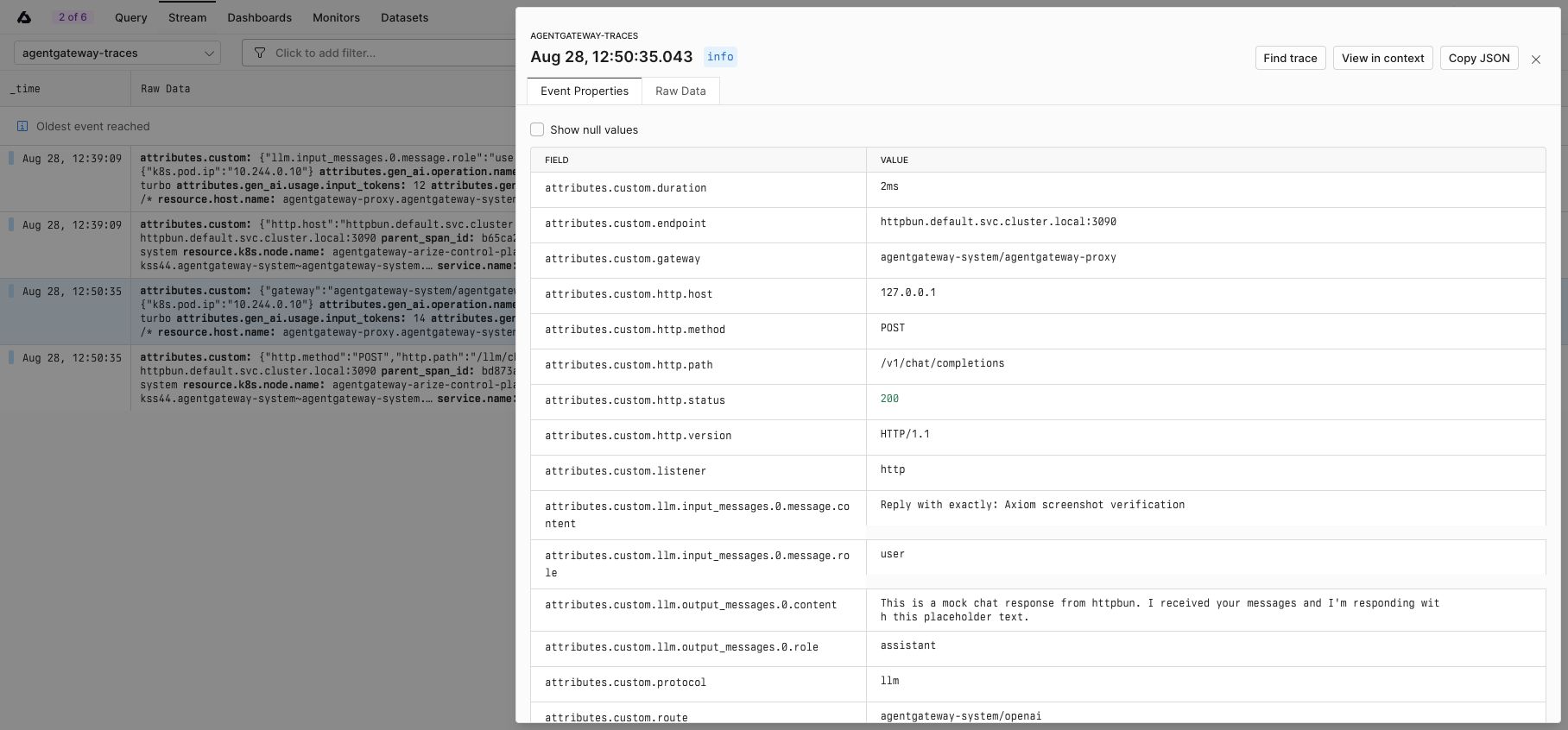
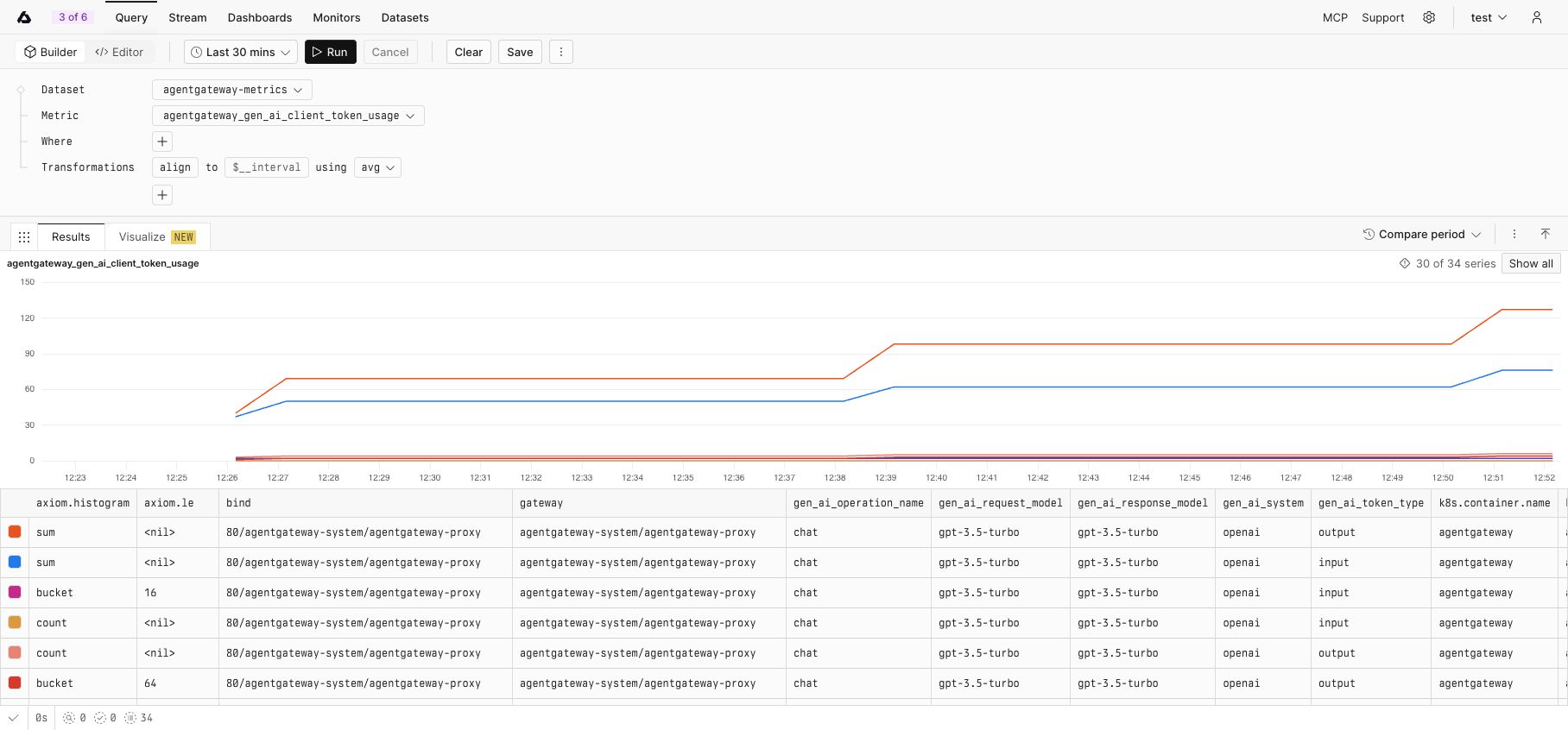
Agentgateway and the collector batch their exports, so allow several seconds for new data to appear. Automatic dashboards and trace-dataset detection can take longer than event ingestion.
Troubleshoot the integration
Confirm that
AXIOM_DOMAINcontains only the ingest hostname for the edge deployment that holds your datasets, without a scheme such ashttps://and without a trailing path.Confirm that the Basic API token has ingest access to all three datasets.
Confirm that the traces and access logs datasets use the Events kind and that the metrics dataset uses the Metrics kind.
Use
x-axiom-datasetfor traces and access logs, andx-axiom-metrics-datasetfor metrics.Confirm that no other policy configures the same telemetry signal on the Gateway.
kubectl get agentgatewaypolicy -n agentgateway-systemAn Axiom policy and a previous observability policy can both report
ATTACHED=True, even though only one trace exporter takes effect. Remove the previous policy, or combine the required settings into one policy.Check the
ACCEPTEDandATTACHEDstatus columns for the backends and the policy.Check the proxy logs for OTLP trace or access-log exporter errors.
kubectl logs deployment/agentgateway-proxy -n agentgateway-system \
  | grep -Ei 'opentelemetry|otlp|export'
Check the collector logs for metrics scrape or export errors.
kubectl logs deployment/axiom-metrics-collector-opentelemetry-collector \
  -n agentgateway-system
For more information, see the Axiom OpenTelemetry documentation.
Cleanup
kubectl delete agentgatewaypolicy axiom-observability -n agentgateway-system
kubectl delete agentgatewaybackend axiom-traces axiom-logs -n agentgateway-system
helm uninstall axiom-metrics-collector -n agentgateway-system
kubectl delete secret axiom-credentials -n agentgateway-system