For the complete documentation index, see llms.txt. Markdown versions of all docs pages are available by appending .md to any docs URL.
Arize AX
Export agentgateway LLM traces to Arize AX over OTLP/HTTP or OTLP/gRPC.
Arize AX is an AI observability platform that accepts OpenTelemetry traces and displays LLM operations, models, and token usage. Agentgateway can export directly to Arize AX over OTLP/HTTP or OTLP/gRPC without a separate OpenTelemetry Collector. You can optionally export LLM inputs and outputs.
Before you begin
- Install agentgateway in your Kubernetes cluster.
- Set up an agentgateway proxy.
- Set up an LLM provider and route in agentgateway.
- Arize account: Sign up for an Arize account.
- Arize API key and Space ID: Obtain an API key and Space ID from the Arize platform.
Get your Arize API key and Space ID
- Log in to the Arize dashboard.
- Go to Settings > API Keys > Service Keys, and click New Service Key.
- For Account Role, select Member. Add an organization, and then add the spaces that the service key can access.
- Create the service key and copy the API service key, such as
ak-5245b124-1ef5-5514-.... - Copy the base64 Space ID for the space that receives the traces, such as
U3BhY2U6TbN4WkU6wshdaf==. The Space ID is different from the space name and organization ID. - Save the credentials in environment variables. Do not commit these values to source control.
export ARIZE_API_KEY="<your-api-key>" export ARIZE_SPACE_ID="<your-space-id>" - Create a Kubernetes Secret in the same namespace as the agentgateway proxy.
kubectl apply -f- <<EOF
apiVersion: v1
kind: Secret
metadata:
  name: arize-credentials
  namespace: agentgateway-system
type: Opaque
stringData:
  api-key: "${ARIZE_API_KEY}"
  space-id: "${ARIZE_SPACE_ID}"
EOF
Agentgateway reads the API key and Space ID from the Secret and sends them as request headers to Arize AX.
Choose an Arize endpoint
Use the collector host for your Arize AX region.
| Region | Collector host |
|---|---|
| US | otlp.arize.com |
| US regional | otlp.us-central-1a.arize.com |
| EU | otlp.eu-west-1a.arize.com |
| Canada | otlp.ca-central-1a.arize.com |
Save the collector host for your region in an environment variable. The following examples use the US collector.
export ARIZE_HOST="otlp.arize.com"Configure trace export
Choose either OTLP/HTTP or OTLP/gRPC. Each option creates the following resources.
- An
AgentgatewayBackendthat connects to Arize AX over TLS and reads the authentication headers from thearize-credentialsSecret. - An
AgentgatewayPolicythat exports sampled LLM traces from theagentgateway-proxyGateway.
The authentication header names differ by protocol.
For OTLP/HTTP, use the arize-api-key and arize-space-id headers.
kubectl apply -f- <<EOF
apiVersion: agentgateway.dev/v1alpha1
kind: AgentgatewayBackend
metadata:
  name: arize-otlp
  namespace: agentgateway-system
spec:
  static:
    host: ${ARIZE_HOST}
    port: 443
  policies:
    tls: {}
    auth:
      credentials:
      - location:
          header:
            name: arize-api-key
        secretRef:
          name: arize-credentials
          key: api-key
      - location:
          header:
            name: arize-space-id
        secretRef:
          name: arize-credentials
          key: space-id
---
apiVersion: agentgateway.dev/v1alpha1
kind: AgentgatewayPolicy
metadata:
  name: arize-tracing
  namespace: agentgateway-system
spec:
  targetRefs:
  - group: gateway.networking.k8s.io
    kind: Gateway
    name: agentgateway-proxy
  frontend:
    tracing:
      backendRef:
        group: agentgateway.dev
        kind: AgentgatewayBackend
        name: arize-otlp
        port: 443
      protocol: HTTP
      randomSampling: "0.1"
      clientSampling: "true"
      filter: 'has(llm)'
      resources:
      - name: openinference.project.name
        expression: '"agentgateway"'
      - name: deployment.environment.name
        expression: '"production"'
EOFThe values under resources are CEL expressions. The extra quotes around static values, such as '"agentgateway"', make the CEL expression evaluate to a string.
Change openinference.project.name if you want traces to appear in a different Arize project. Arize creates the project when it receives the first trace.
Agentgateway emits model, provider, operation, and token usage attributes that follow the OpenTelemetry GenAI semantic conventions. Arize AX natively maps these attributes to OpenInference fields.
Optional: Export LLM inputs and outputs
The default configuration does not export prompt or response content. To display structured input and output messages in Arize AX, add the following attributes to the AgentgatewayPolicy for your selected transport.
Important
LLM prompts and responses can contain personally identifiable information (PII), credentials, or other sensitive data. Enabling these attributes sends that content to a third-party SaaS platform. Review your organization’s data-handling requirements and configure appropriate guardrails or redaction before enabling them.
spec:
  frontend:
    tracing:
      attributes:
        add:
        - name: llm.input_messages
          expression: 'flattenRecursive(llm.prompt.map(c, {"message": c}))'
        - name: llm.output_messages
          expression: 'flattenRecursive(llm.completion.map(c, {"role": "assistant", "content": c}))'
Optional: Add resource attributes
Agentgateway supports custom OpenTelemetry resource attributes through spec.frontend.tracing.resources. Resource attributes are added to every exported span and can help you filter and group traces in Arize AX.
In Kubernetes mode, agentgateway automatically sets service.name, service.version, service.instance.id, and service.namespace. The preceding OTLP/HTTP and OTLP/gRPC configurations explicitly set deployment.environment.name. You can add application-specific attributes such as model_id or model_version to the resources list in the AgentgatewayPolicy for your selected transport.
Agentgateway combines these custom resource attributes with the automatically populated service.* attributes at runtime, so you do not need to repeat the service attributes in the policy.
spec:
  frontend:
    tracing:
      resources:
      - name: openinference.project.name
        expression: '"agentgateway"'
      - name: deployment.environment.name
        expression: '"production"'
      - name: model_id
        expression: '"gpt-4o-production"'
      - name: model_version
        expression: '"2026-08-27"'
Resource values are static CEL expressions that are initialized with the tracer and apply to every request. Do not set a static service.instance.id, which must identify a unique agentgateway replica. If agentgateway routes requests to multiple models, use the default gen_ai.request.model and gen_ai.response.model span attributes instead of setting a single model_id resource value.
For more information, see Add span and resource attributes.
Get the gateway address
Tip
Kind cluster? Kind does not support LoadBalancer services by default. To use this option with a Kind cluster, install and run cloud-provider-kind.
The following command reads the LoadBalancer IP address or hostname, whichever your cloud provider assigns.
export INGRESS_GW_ADDRESS=$(kubectl get svc -n agentgateway-system agentgateway-proxy \
  -o jsonpath="{.status.loadBalancer.ingress[0]['hostname','ip']}")

echo "Gateway address: $INGRESS_GW_ADDRESS"Verify the integration
Verify that Kubernetes accepted the backend and attached the policy to the Gateway.
kubectl get agentgatewaybackend arize-otlp \
  -n agentgateway-system
kubectl get AgentgatewayPolicy arize-tracing \
  -n agentgateway-system
Both resources should report
ACCEPTED=True, and the policy should also reportATTACHED=True.Send an LLM request through agentgateway. The following example assumes that you configured an OpenAI-compatible provider and the
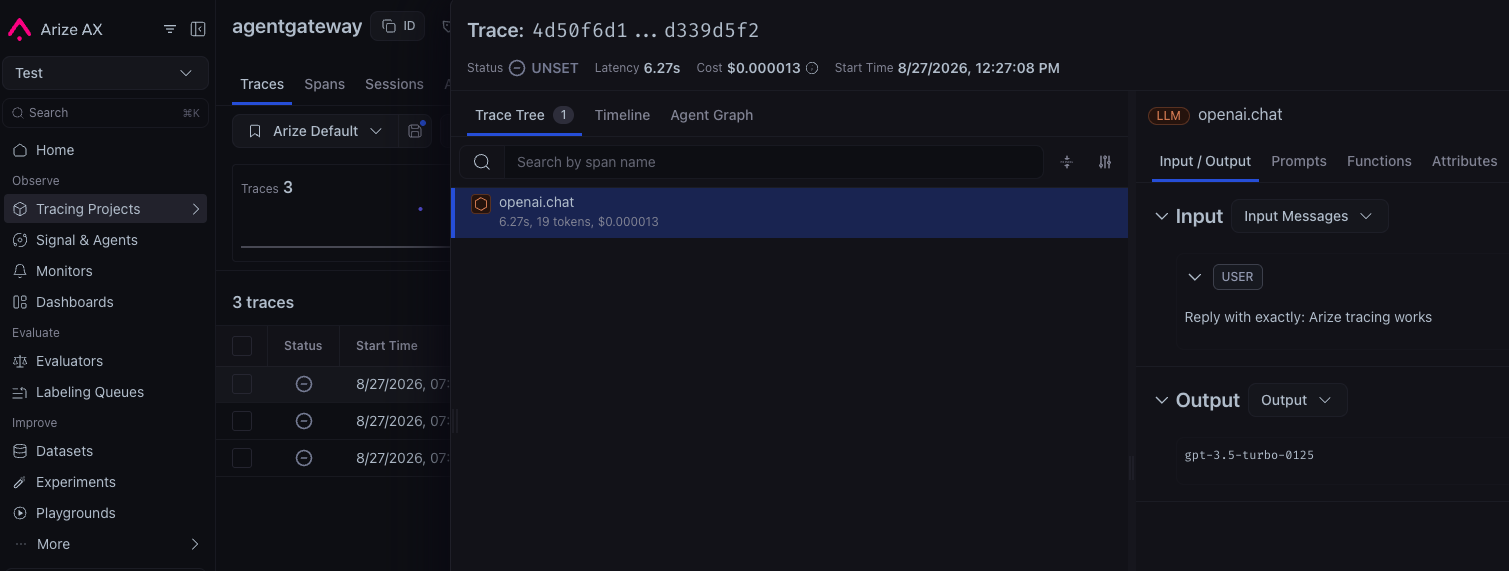
gpt-3.5-turbomodel.curl http://$INGRESS_GW_ADDRESS/v1/chat/completions \ -H 'content-type: application/json' \ -d '{ "model": "gpt-3.5-turbo", "messages": [ { "role": "user", "content": "Reply with exactly: Arize tracing works" } ] }'Find the request in the agentgateway proxy logs and copy its
trace.idvalue.kubectl logs deployment/agentgateway-proxy \ -n agentgateway-system \ | grep 'protocol=llm' \ | tail -1A successful request produces a log entry similar to the following abbreviated example.
info request gateway=agentgateway-system/agentgateway-proxy http.method=POST http.path=/v1/chat/completions http.status=200 trace.id=c4e407d74b582620f42f6fd3382bd63b span.id=f97625410e525bac protocol=llm gen_ai.operation.name=chat gen_ai.provider.name=openai gen_ai.request.model=gpt-3.5-turbo gen_ai.response.model=gpt-3.5-turboIn Arize AX, open Tracing Projects, select the project that you set in the
openinference.project.nameresource attribute, and search for the trace ID. Trace export is batched, so allow several seconds for the trace to appear.
Troubleshoot trace export
- Use the header names that correspond to your selected protocol: hyphenated headers for OTLP/HTTP and underscore headers for OTLP/gRPC.
- Confirm that the
arize-credentialsSecret is in the same namespace as thearize-otlpbackend and contains theapi-keyandspace-idkeys. - Confirm that the collector host matches your Arize region and that
openinference.project.nameis set. - Check the
ACCEPTEDandATTACHEDstatus columns for the backend and policy. - Set
randomSampling: "true"while testing so that agentgateway starts a trace for every request. - Check the proxy logs for OpenTelemetry exporter errors.
kubectl logs deployment/agentgateway-proxy \
  -n agentgateway-system \
  | grep -i opentelemetry
For more information about Arize authentication and OpenTelemetry export, see the Arize AX manual instrumentation documentation.
